Google Ads Search: What I Learned

Google | LinkedIn

Google is an extremely useful search engine that is used all the time. I know that I Google something at least twice a day, and I use it at home, at work, and at school. It is such a diverse tool that can be used from when I want to buy something online to when I need the answer to something for school. So it makes sense that Google Ads is so useful for businesses to use! Let’s take a look at what I learned from my Google Ads Search that I completed this week!

Grow your business with Google Ads

Google Ads are built around three core principles: relevance, control and results. Therefore Google Ads can help all businesses and their marketing goals as these principles align with them all. There are categories that Google divides their ads into:

  1. Search
  2. Display
  3. Video
  4. Shopping
  5. App

The category you choose depends on the product or service you are offering, and the outcome you want from your ad set. Using Google Ads will connect you to the audience that you want and then transform them into customers for your business. So many people use Google, so by using this platform to advertise your business you are reaching a large pool of people to help you succeed.

Explore the value of Google Search

This Png File Is About Valu - Value Png Clipart (#1980593 ...

There is clear value in Google Search. How many times have you heard the phrase “just Google it”? Potential customers are all over Google, and you yourself have probably been one at a point too. Every day, about 3.5 billion searches are made using Google Search. Your ads could appear in some of these searches for your relevant customers. To create a Search advertisement, you create a Google Ads account. You then select your campaign, or your marketing goal. You select a network (which includes Googles partners) and which devices you want your advertisement to appear on. You also select which language and location you would like your business to appear, depending on your goal. Setting a bidding and budget is important, as you want to spend an amount relevant to what you want from the advertisement.

You can manage where your advertisement shows up through keyword targeting. Choosing keywords where your advertisement can show up is important, and also selecting whether you want a broad match, phrase match, negative keywords and so much more.

Understand the Google Ads auction
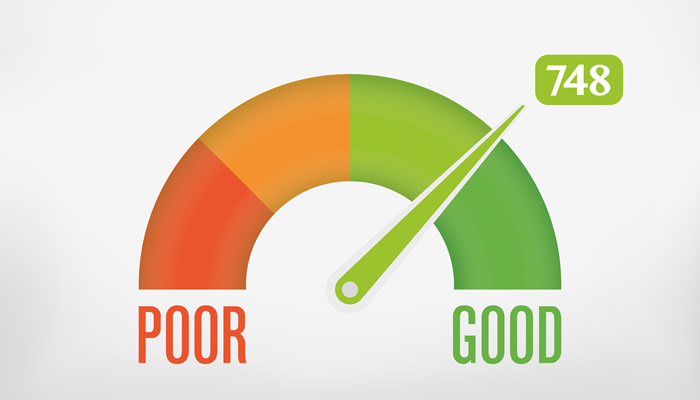
Understanding Your Credit Score | CreditCardsCanada.ca

Google Ads uses an auction system to rank the ads that appear on the search results page, and to determine the cost for each ad click. 

There are three main factors that determine ad quality:

  1. Expected click-through-rate
  2. Landing page experience
  3. Ad relevance

You can improve your ad rank by evaluating your quality score, which is broken down by those three factors. This is really useful to increase the efficiency of your advertisement.

Deliver the right message with text ads

There are three required parts of a text ad:

  1. Headline
  2. Description
  3. URL

In each text ad group, three to five ads should be implemented. Text ads are useful as they are to the point and provide relevant information.

Make ads relevant with search ad extensions

Why do users search on Google? They want relevant information that answers what they are searching for and therefore they want ads that add to that experience. Therefore, relevant ad extensions provide extra information that help users make informed decisions. This will increase your engagement, provide better quality and more qualified leads. So what extensions should marketers use? First, we will look at universal extensions:

  1. Sitelinks: additional links that appear just under the text of your search ads
  2. Callout extensions: short, specific snippets of text that are 25 characters or less
  3. Structured snippets: allow you to describe features of a specific product or range of products or services offered by the business
Location Clipart Gps Tracker - Map And Location Png Transparent ...

Location extensions can also be useful. You can show your business address, phone number and map marker beside your ad. These are great if you have a physical shop that you want to promote visiting too.

            Call extensions do exactly that – allow people to call your business directly from the phone number linked to the ad. It provides customers with a convenient way to reach you if you do lots of business over the phone. If you would rather use an online format to communicate with your customers, try message extensions instead. If your business has an app to promote, then using app extensions is useful as it can drive business straight to your website or app store to download it!

If your business has a specific price range, then setting that from the start could be useful for your advertisement. Therefore, using price extensions showcases the range of products or services with their specific price point. Or, if you have a really great sale going on, using promotion extensions will showcase that and can drive in people looking for a sale!

Google Ads offers the option of automated ad extensions if you don’t want to manually create them. It will pull data and present customers with relevant information

Increase efficiency with automated bidding

Dollar Sign Money Clip Art, PNG, 1140x1140px, Dollar Sign ...

Google ads offers automated bidding to choose the most successful bid for your advertisement project. It offers a variety of options to choose from. The benefits of automated bidding include:

  1. Machine learning
  2. Time saved
  3. Auction-time bidding
  4. Depth of signals use and cross analysis

You can choose the bidding strategy that aligns with your marketing goals. If your goal is visibility, awareness-based strategies would work best for you. If you want clicks, you should use consideration-focused bidding strategies. Conversion-focused bidding strategies work best for conversions and revenue-focused ones for increasing your revenue.

Reach valued customers with search audiences

Google’s Audience solutions can help you reach customers. If your goals are awareness, consideration and conversion/loyalty, then this is a useful tool to use. It has a variety of solutions so that you can reach those valued customers and really meet their expectations. These solutions include, but are not limited to:

  • Detailed demographics
  • Affinity audiences
  • In-market audiences
  • Similar audiences for search
  • Customer match

Google Audiences can enhance your search strategy in one of three ways: variable bidding, keyword expansion, and creative customization. Using your own data from your advertisements also creates a valuable audience.

Boost performance with optimization score

Percentage clipart, cliparts of Percentage free download (wmf, eps ...

An optimization score is an estimation of how well your search campaigns are set to perform on a scale from 0%-100%. A higher score means your account is running to its full potential. Your score will also provide you with recommendations to increase the score and therefore allow your ad campaign to run better. Your optimization score is instant, customized and scalable and can help improve so many businesses. It is calculated by looking across key parts of your account. By taking statistics, it can suggest what can be done to reach your full optimization potential if you accept the recommendations.

Increase conversions with Performance Planner

Free Planner Cliparts, Download Free Clip Art, Free Clip Art on ...

Planning is what is going to make your Google Ads a success. You should plan your budgets on a monthly basis. Therefore you can evaluate all the statistics and tools Google Ads provides you so that you can ensure you budget is working well and you are successful in your ad campaign. Performance planner is a forecasting tool that reveals the possibilities of your advertisement and helps you budget. It determines the optimal bids and an average daily spending limit.

The Performance Planner will help increase your return on your investment and drive more conversions. It will recommend changes for you advertisements.

Conclusion

I learned a lot in this certification course. Personally where I am at in my current career, I wouldn’t be starting a Google Search ads anytime soon. However, I decided to use this information and search up my current employer on Google and see what showed up:
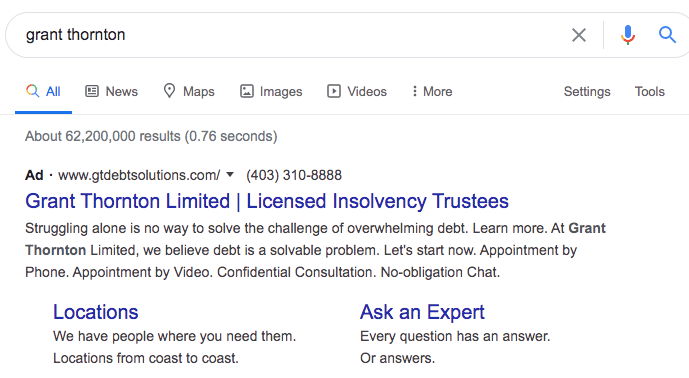
This is a text ad, which I learned about near the beginning of the course. As you can see, it has the headline “Grant Thornton Limited | Licensed Insolvency Trustees”, which is a valuable headline as it shows the company name and what they do. It then has a short description of what service is provided from the company which is personable and offers options like “confidential consultation” and “no-obligation chat”. Then there is the URL to the main page, the locations page, and to an ask an expert option, all relevant to those who may be searching this up. Clearly my company uses Google Search properly and to a good potential!

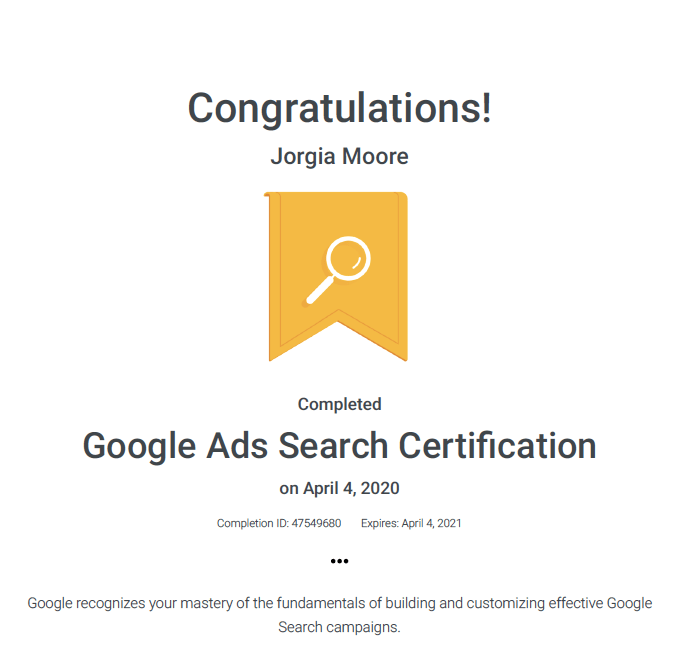
And here is my certificate to show that I completed the course:
As I said at the beginning of my post, all information in this article is found from the Google Ads Search course, which again can be found here: https://skillshop.exceedlms.com/student/path/18128-google-ads-search-certification
Social CRM

Social customer relationship management is a new way of marketing in today’s technology. It is a marketing strategy that is supported by online tools such as social media. It is a social aspect of how to interact with your customers online. Social CRM is a powerful tool for social engagement. Click here for the video or read below!

Get Started

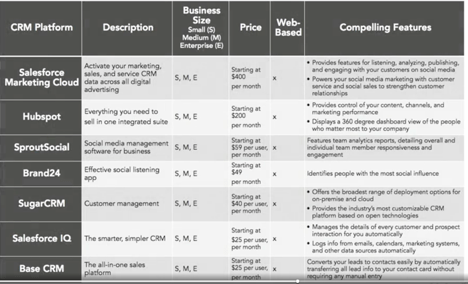
Social CRM is a new way of marketing. It allows you to pull information from all social media and conversational platform (Adams, 2018). There is lots of different CRM software that you can choose from and it has really developed over the years. Choosing the right one for you is important. The software has tools that let you manage everything from sales, marketing, and customer service. Depending on what your business is like will determine which software you choose. Consider things like business size, customer service level, brand monitoring, etc. See below for a table of the top social CRM platforms (Adams, 2018, 3:23).

Develop Your Strategy

Image result for campaign

To develop your strategy you need to consider branding first off. The brand’s “toolbox” holds the identity, communication, logos, awareness, loyalty, etc. (Adams, 2018). This branding is going to create the personality around the business itself. Social CRM is useful in tracking your brands image across multiple platforms (Adams, 2018). This is important to ensure your message is clear and consistent between all platforms, as well as consistent with what you are trying to communicate with your customers. It gives a 360 degree view of all social media.

The rules of engagement dictate how you manage your social media. You need to set clear rules in order to handle your social media properly. Every business will have different rules of engagement on how you interact with your customers. You could set an auto-response, when and how your customers can reach you, and overall communication. Social CRM is also very useful for creating campaigns to promote your business and brand and can help create the most successful types based on all your social medias. It allows you to engage with your customers and drive demand in these campaigns (Adams, 2018).

Manage Social CRM

Image result for phone clip art

Influencer marketing is having power to affect a person or thing (Adams, 2018). Influencers drive actions and awareness. This is powerful for marketers and they can use different influencers in their social CRM strategy to expose their brand to large amounts of followers. Brands can also engage with prospects in different ways through social CRM. You can see your prospect in all lights and therefore provide the best value. You can contact leads through different social media and interact with people promptly and sometimes instantaneously, which is important.

Customer service can also be managed using social CRM. You can have more ways to interact with your customers and you can reply to questions and concerns instantaneously to increase your profit and reach. The customer feels more in control and you can prevent issues before they even happen.

Your Toolkit

Image result for toolbox clipart

Business Process Documentation include all documents that support a process (Adams, 2018). This means that all your documents supporting your social CRM should be documented and kept in order to create a successful business. You should asses your social CRM process by (Adams, 2018):

  • Ownership
  • Goals
  • Metrics
  • Interfaces
  • Documentation
  • Integrity
  • Alignment with business vision

This creates a clear roadmap and being organized is important! You can also pull analytics to create the most successful social CRM. Keeping up to date reports on your metrics, goals, customer behaviour and site traffic (Adams, 2018) will create a stronger social CRM and very successful overall.

My Conclusion

Image may contain: 1 person, smiling

            From this video, I see that there are many aspects of social media that we can’t possibly be able to see them all without help from other data networks. My dance group tries to have a strong social media presence (see beside for an example), and I think a tool like these would help drive traffic into ticket sales and really be able to create a strong, consistent message across all of social media. I think that sometimes our different social media pages don’t always look consistent or create a consistent brand. Our Instagram is way different from our Facebook, and I think it makes it harder to interact with our audience and create strong, consistent traffic. I really think that bringing forward these tools as a possibility to invest in would be useful and in the long run create a successful brand on our social media, which is important as our audience age is from 18-30, all whom are very active on social media.

References

Adams M. (2018, April 11). Social Media Marketing: Social CRM. [Video file]. Retrieved from https://www.linkedin.com/learning/social-media-marketing-social-crm/welcome?u=2109516

Social Media Marketing: ROI

Successful social media marketing uses data to drive awareness and sales with their posts. In Carlos Gil’s learning seminar, he teaches you how to measure social media ROI on all different platforms using reporting tools and indicators.

Social Media KPIs and Tools for Measurement

In todays age, social media is key. Which social medias you choose are based on your business objectives (Gil, 2019). Social media should be an extension of your business objectives and compliment them, so choose which sites carefully. There are four pillars to a social media strategy (Gil, 2019):

  1. Content: what a user sees and engages with from your brand
  2. Community: the users who engage with your content
  3. Consistency: how often you post/check in
  4. Conversion: the actions users take when they engage
Image result for 4 pillars

These four Cs are important to remember in your social media. There are a couple KPIs (key performance indicators) you should use, but vary based on your brand. Things like impressions, which should be used cautiously, engagements, views, length of views, average watch time, and clicks (Gil, 2019) are all good data and metrics you should be using to craft your business social media. There are different tools to use for this that have different options, prices, and goals. Here are some Gil’s listed to use, but always do your research. And of course there is built in tools on your social media platform.

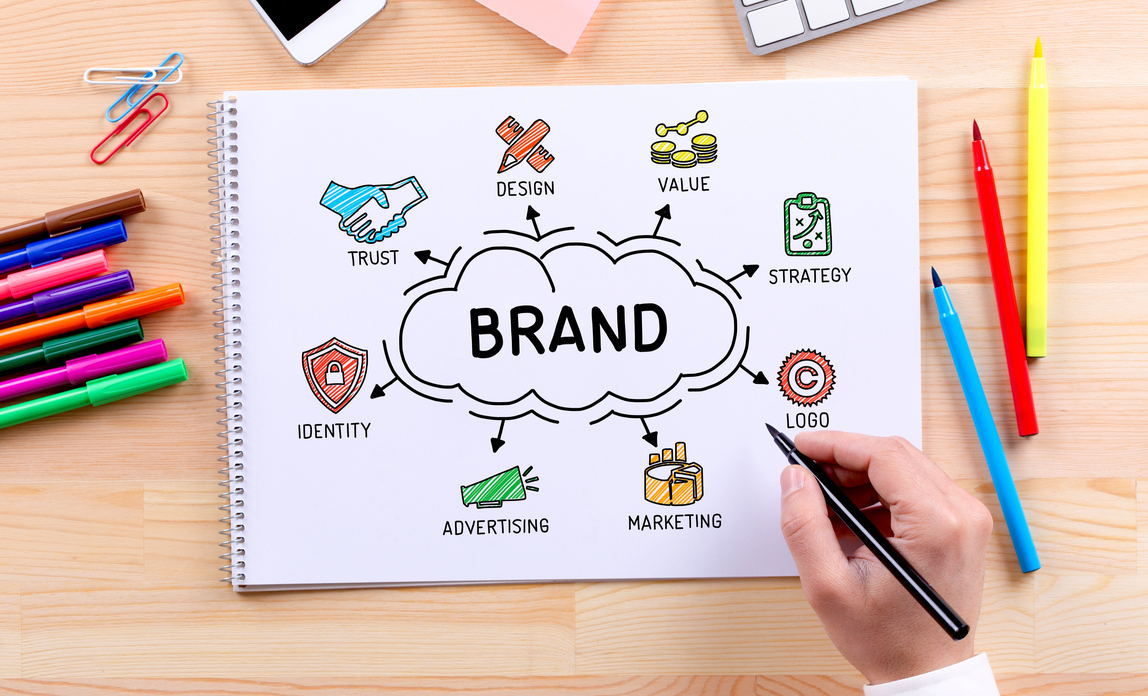
Image result for brand
  • BuzzSumo
  • Keyhole
  • NetBase
  • Brand24
  • Buffer
  • Hootsuite
  • Sprout Social

Decoding Social Media Analytics: What Does It Mean?

The Facebook insights we learned in our Facebook ad LinkedIn learning came into play in this video too. Facebook analytics are so effective and valuable for businesses. Facebook definitely has the most options for analytics and give you different ways to drive engagement and sales in a fun creative way, with lots of useful data.

Image result for instagram

 Instagram also has great insights such as comments, bookmarks, shares and of course followers and likes (Gil, 2019). This can help you create content that your audience likes and seems to engage to. Anyone can like a post, but these other engagements are what create strong analytics and data for you to use. It is important to go beyond measuring likes.

Driving Measurable ROI on Each Channel

LinkedIn is a great social media network for business professionals and having a defined presence is key. LinkedIn lets you show up in a google search for possible prospects to find. The metrics that are important here are who viewed your profile, and search appearances (Gil, 2019). Keep tabs on these for strong ROI. You can also engage with potential buyers by seeing who is viewing your profile. Twitter also has analytics you can use. You need to be very active on Twitter platform because it is so real-time (Gil, 2019). Be active to create comments, clicks, views, etc.

Image result for youtube engagement

You can not only provide views and engagement through YouTube, but you can also receive money by running ads on your videos. That is free money for your business while also creating engagements and views. You use YouTube Analytics for this (Gil, 2019). You can optimize keywords when uploading your YouTube videos to drive more views to your videos (Gil, 2019).

Bonus Strategies for Maximizing ROI

Some little extras to really maximize your ROI include using Twitter Cards, Instagram stories, YouTube tools, Bit.ly to shorten your links for visual appeal, writing quality copy for Facebook and LinkedIn that are short and to the point, and so much more (Gils, 2019). Here is an Instagram story ad that popped up within three minutes on my Instagram that can appeal to the audience (me) easily:

My Viewpoint

I personally use social media a lot and know how effective it is for your brand. I buy things because of social media all the time when an advertisement pops up. I find that Instagram stories are an awesome way to create engagement for my personal demographic and friend group, so I loved to see that in this video. Instagram stories can be so effective and you can make them more fun and engaging for your audience, like the dancing gif in the screenshot I attached. Overall, monitoring your social media using these tips are absolutely key for a company, and I know I wouldn’t buy from something that doesn’t have social media value.

Works Cited

Gil, Carlos. 2019, October 9. Social Media Marketing: ROI. Retrieved from https://www.linkedin.com/learning/social-media-marketing-roi-2/the-roi-of-social-media-marketing?u=2109516

LinkedIn for Students

A LinkedIn account is a valuable tool for students to use for professional networking and building connections.

Creating a LinkedIn Profile

Image result for linkedin

Setting up a LinkedIn account is very similar to setting up most social media platforms. You are going to want to head to the LinkedIn website to create your profile. Enter the information prompted and then follow the steps below:

LinkedIn members who use a profile picture get far more views than those who do not, so this is an important step (Schinkten, 2018). You can change or edit your profile picture at any time. Use a recent photograph that allows people to see your face and is not too zoomed out. Have a good quality professional photo. Adding a background image is not required but recommended to really make your account pop and stand out to everyone else. Choose a clear and professional background photo.

Your headline is one of the first things people see on your profile, so you want it to be powerful. Your student account will default to “student at school” but you have the ability to change this. Most profiles have their title and their job company as their headline. You can customize your headline to add what kind of student you are such as Business Administration or Engineering. You can say what you are aspiring to be or what you are passionate about to show a bit of your personality.

The summary which is also very important. You can use this as an opportunity to share some of your accomplishments, career goals and mission statement. You want to list all of these and more. Create a summary saying who you are and what intrigues people about you, as well as your interests too. Then at the end of your summary, you can make a bullet point list of your areas of expertise. This allows the reader to see these key points if they are just skimming through your summary and don’t want to read it all. These keywords will bring people to your profile as well, so spend some time thinking about the ones that relate to you and your industry you are trying to promote.

You should add all of your work experience to your profile including summer jobs and internships. You want to add the job title, location and when you worked there as well as include some of your tasks there. You can also include a media link if you desire. You can also choose if you want to share this work experience change with your network, which will post it for your connections to see. You can also add your volunteer experience to your profile for volunteering you are actively participating in.

The educational part of your LinkedIn profile is important while you are a student. You can list the school you are attending as well as what major or degree you are working towards. You can add your high school, as well as tech schools. You can also add past degrees or masters. You can also add activities such as clubs, societies, or other extracurriculars with a description. You can add your GPA if you are proud of it!

Add skills. This part is really cool because you can add skills from a list that you believe relate to you and your career. Your connections can then go and endorse you for these skills, which will show on your profile that this many people have endorsed or supported these skills on you. If you have a hard time choosing skills, ask your coworkers, classmates and mentors. This is great for students that don’t have job experience to show, but these skills that are backed up.

There is an option to get recommendations on your profile. This is a lot like asking someone to write a recommendation letter for you. This is a bit more in depth than just endorsing a skill, but it is valuable to have on your LinkedIn page from someone like a teacher, boss, or co-worker. On their profile, you can click more and click request a recommendation. It will bring up a few questions you have to answer that are self-explanatory but asking is valuable.

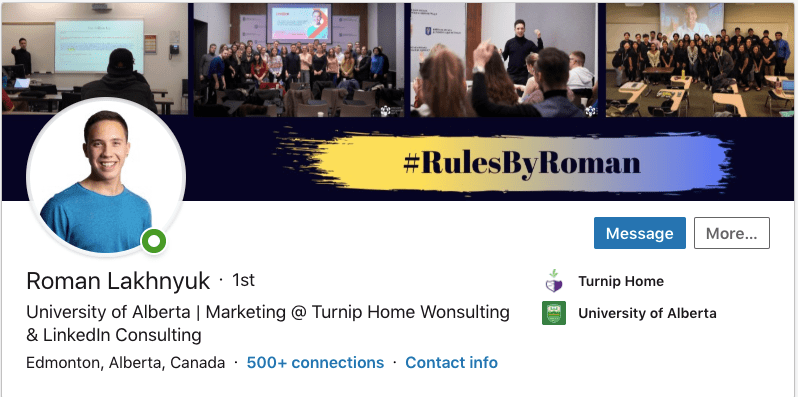
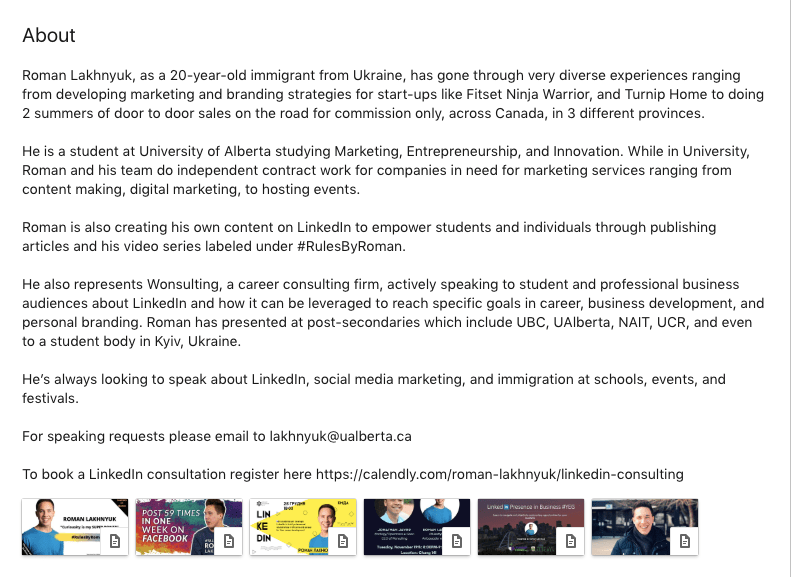
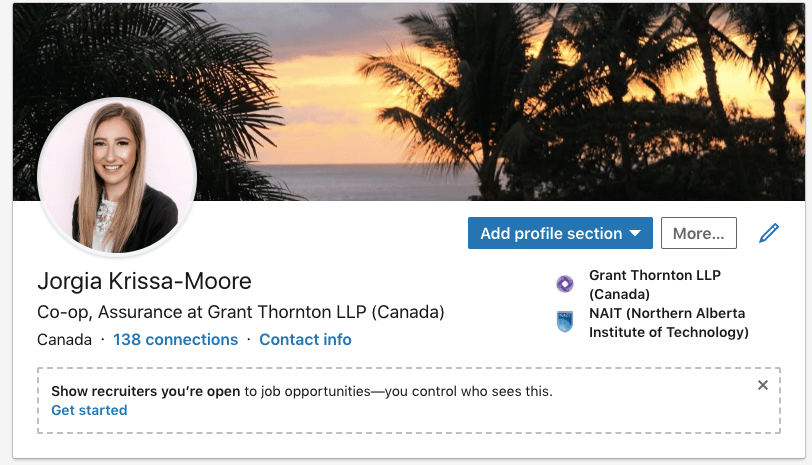
This is a lot of information to take in when it comes to creating your profile, but I think having an example is good. My friend is very into LinkedIn and does presentations at schools and businesses on how to use and improve your LinkedIn and works for Wonsulting that consults about LinkedIn. He has given me permission to use his profile as an example in my paper, so I want to show you a basic overview of his page so you can see what an effective and well utilized profile looks like when creating everything summarized above. Click here to see his whole profile.

Build Your Network

According to the 2017 Global Talent Trends, two of the most popular ways that companies find new hires are through employee referrals and social professional networks (Schinkten, 2018). This is why having a LinkedIn profile that is professional is important when you are building your profile. LinkedIn lets you connect and collaborate with other individuals in your industry, so building that big network is important. Building your network, you have different people (Schinkten, 2018):

  • The advocate: someone you know on a personal level
  • The strategic-in: someone who is well connected
  • The subject matter expert: offers superior insight on a specific industry

            LinkedIn is a way to connect with people on a professional level. There are many different ways to build your network: see suggested people, search people in the bar, search keywords and so much more. The easiest way to do this is to play with it by yourself and dedicate time to building your professional profile. The alumni tool and university pages are also useful to find people as well. You can use LinkedIn groups which are trusted communities to expand your network also.

Using LinkedIn Day-to-Day

The first way to utilize LinkedIn is through scrolling through your news feed and being engaged. You can:

  • comment on people’s updates, react, and post your own professional content.
  • follow companies and influencers to stay engaged and learn tips and tricks to improve your own LinkedIn.
  • share your job updates and your accomplishments.
  • publish articles that relate to your passions, industry and job to stay relevant and engaged on the feed.
  • message different people to build connections, create networks, and learn about the industry.

Roman is really good at using LinkedIn day to day, and he isn’t afraid to message people asking for advice and to meet for more experience, connections, and it is really useful.

Job Search and Company Research

A way to explore potential careers is to just search for companies you want to work for. You can learn about the company and see potential positions by using the “see jobs” tool on their page. You can also search profiles of other professionals in your desired careers or just search some of the keywords of your desired careers. Company pages are full of valuable information related to a company. If you have premium account, you have access to the company insights page which can be useful for your needs.

The biggest thing is to set up job alerts if you are actively looking for a job. When you filter down a search to criteria, you can see all the jobs that fit these criteria, you can create search alert. When jobs that fit these criteria come out, you will get alerted on your account.         

Manage Your LinkedIn Account

Personally, for students, I don’t think using LinkedIn Premium is the best tool as students have a small budget. There is so much LinkedIn offers for free that is so good for students. You can explore your personal settings and ensure your privacy is set to how you want it, as you should for any social media. Your account can be a reflection of who you are and what you want from your account.

It is a good idea from time to time to download your data from LinkedIn to use for your resume. In the Settings & Privacy tab, click Account then click Download Your Data. You can download and archive all of your data here in different ways, depending what you want. This is also good in case your account ever gets deleted so you can get your account back to where it was and not start from the bottom.

My Personal LinkedIn

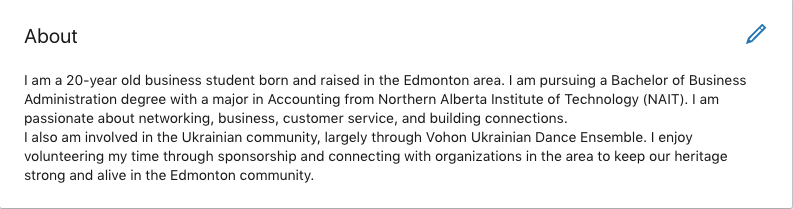
After learning this information, I made some changed to my summary as I felt like my summary was short and not effective. I also added a cover photo to make my profile pop more as it is easy to do.

Overall, I think I need to check my LinkedIn more regularly and be more engaged on my news feed. If I start with dedicating time once a week to interact, engage, and find more connections I think my results will be stronger. This was a good eye-opening assignment to use LinkedIn more frequently and with a bigger purpose to get everything this platform offers. It is also a reminder to stay professional on this platform.

Works Cited

Schinkten, Oliver. 2018 October 18. Learning LinkedIn for Students. Retrieved from: https://www.linkedin.com/learning/learning-linkedin-for-students/welcome?u=2109516

Advertising on Facebok

I am sure everyone has seen an advertisement while scrolling through their Facebook page. But how did these ads appear on your page? Let’s take a look..

How Facebook Ads Work

Facebook advertisements are easy to create and use. They also are affordable and appeal to a wide variety of audiences. They are a really good way to get in front of the right people. The first thing to do on Facebook ads is choosing a goal for what you want to come from this ad.

An advertising objective is what you want people to do when they see your ad. You could want them to purchase something, subscribe, like your Facebook page, use your services, etc.

Image result for location

Facebook has different ways to target your audience. Location is a big one – do you need to live in a certain city or area to use this? Then there is demographics which is things like age and gender.

Facebook can provide information for your advertisement based on reach. They provide things like click-through rates, cost per 1,000 impressions, cost per click, and so much more. All of these are really useful for future advertisement campaigns and how you can improve your ad.

Facebook organizes your advertisements into three levels: campaigns, ad sets, and ads. The campaign is the top level which is what you want to achieve. Ad sets define the target options and then the ads show the physical ads that you have out there for your audience to see.

Audience Targeting

Interest targeting is great for Facebook ads because they have so much information on the users interests based on their activity, like likes, comments, and profile information. This information is then used to create different audiences that you can add to your advertisement set based on what you want.

Behaviour targeting includes things like how much time you spend online, your buying behaviours, spending habits, and more. Facebook has different partners that provide this information to them as well. This is what makes Facebook ads so effective – the information they have to ensure your product or service is targeted to the right people.

This is an advertisement that showed up on my Facebook. It is targeted to me – I do dance and am very active, therefore am constantly purchasing and wearing athletic leggings to keep up to my lifestyle. I comment and share dance posts and like lots of those pages, so it makes sense! It is crazy that Facebook knows this about me and can target me.

How to Create Facebook Ads

Identifying your primary audience is very important when creating Facebook ads. This tool can create a very specific audience based on your product and service. The more relevant your audience is to your product, the better your ad will do.

Choosing a budget for your advertisement is important so you do not spend too much on these ads. It is best to start smaller and then see your engagement and how well these ads do before having a big budget.

Ad placement is where your advertisements show up. Facebook will automatically recommend where these ads should show up which is a good tool. You can also edit the placement.

The last step is the ad creative tool. This is where you create an ad name and where you choose to create an ad or use an existing post. You can do your ad in the way of a single photo or video or choose a carousel that shows multiple.

This is another ad that showed up on my Facebook, and I thought it was funny because my brother works for GoAuto, so it is relevant but also not necessary as I already see all my brothers posts. Notice the “Sponsored” below the page name. This is an ad placement embedded within my newsfeed and looks like a regular post from friends, minus the sponsored part.

Image result for money and ads

It is easy to just click on an advertisement and buy something, but it is important to think how that ad appeared and appealed to you before you go spending money or subscribing to something.

View Your Advertising Data

Facebook has advertising reports that you can create. There is a reports section where you can pull different reports on your ad that are important to use. You can export this data to Excel, where it is helpful to see and use.

Image result for metrics

Success metrics are also important to use. These are things like number of clicks, number of impressions, etc. Basically everything you need to track your success with the advertisement and how well it is doing for what you need.

Implement Best Practices

Make sure to follow the Facebook guidelines:

  • no images with more than 20% text on them
  • landing pages must be relevant to the ad
  • no nudity
  • no violent, shocking, disrespectful or sensational language
  • no personal characteristics

My Personal Insight

Personally at this point in my life I don’t really have a need to create Facebook ads as I am working at an accounting firm. However, I find it so interesting and useful to understand how advertisements are catered to consumers and consumer behaviours are connected to this. Overall this learning was so useful and makes me a conscious consumer as I know how advertisements can be placed to try to convince me to spend money.

Image result for thinking emoji

I think that moving forward I am going to be more conscious and really think of the advertisements on my page as I now know the process. I am going to evaluate how well they work and really look at what is being done on the advertisement. Also, how does this ad appeal to me, the audience? In my current job I have no need for making Facebook advertisements but I am going to be a more active audience. I think I am sometimes bad with my money and can buy everything that just appeals to me, so I should be conscious on Facebook for this problem.

Works Cited

 (2020). Retrieved January 31, 2020, from Linkedin.com website: https://www.linkedin.com/learning/advertising-on-facebook-2/next-steps?u=2109516

My LinkedIn Learning Experience

I recently watched a LinkedIn Learning seminar on Marketing Copywriting and had to write a summary on it. What I learned from this assignment is below, as well as how you can apply it to social media marketing!! Here is a link to the video if you would like to watch it yourself: https://www.linkedin.com/learning/learning-to-write-marketing-copy/next-steps?u=2109516

Summarizing: less is more

Summarizing is important in social media marketing, as you may need to take something like a whole event and compress it into one social media post. I learned that when improving my summarizing, I need to focus on using my own words and pulling less from the whole thing. Ultimately, I wouldn’t take whole quotes from an event and put them in my post, but rather use my own words and experience. I appreciate my classmates constructive feedback in pointing this out so I can work on improving it in the future. I need to differentiate summarizing between papers that I write with facts and references.

Format

Remember to use good format in your social media posts! Depending on your platform, you will use different layouts and formats but you always want to make sure that they are easy to read. If your writing is hard to follow, people will give up and not read your content.

Grammar is also very important in social media marketing. Download a widget like Grammarly so that it can check your spelling, punctuation, etc. before you submit a post.

My classmates all said that my writing is easy to follow, formatted nicely, and I had little to no grammar mistakes. This is the first thing people notice and will determine whether you are taken seriously. I used Grammarly to check my work, so I can confirm that it works good based on classmate feedback!

Marketing Copywriting

Marketing copywriting is an advertising type of writing used to persuade an audience to purchase a product or service. There are three ways to classify copywriting: by collateral, by medium and by style. The next way to classify copywriting is by medium. This includes online, print, radio, and in-person speech. However, social media or website is not a form of medium, but rather a channel. It is just the pipe of where the message passes but not the environment where it is received. There are obviously many styles to appeal to an audience, and you can see those different styles on advertisements in all medium and collateral.

Headlines grab attention

Headlines are very useful for social media marketing! They are the first thing you see so remember:

  1. Not be mysterious
  2. Mostly avoid fear mongering
  3. Use a few formulas
  4. Write lots of headlines
  5. A headline isn’t a caption

What I learned

Overall, I found this LinkedIn Learning seminar very useful. The most useful tool I found in this seminar is the section on writing headlines. Ultimately, creative title and subheading titles is something I struggle with in my writing for school and work, so having this tool is useful to me moving forward with that. A specific example is that for my current job, I have to come up with titles for events on posters, along with a subheading to intrigue people to come to these events. I find this very difficult to do but moving forward I will definitely write a list of headlines as I usually just keep rewriting the one headline. I will actively think to not be mysterious, but rather direct and clear while staying intrigued. In my charters for my events, I do have to think of social media and poster headlines, and I think the tips in here will be super useful.

My classmates said that this was a good conclusion as I included an example that is directly related to myself and was able to tie in the whole idea to myself. This allows you to relate to your audience and for you audience to take more away from the paper.

I had an event in December called “Latin Night”. My headline was “Is the weather getting you down? Come beat the cold with a spicy Latin party at the Nest.” It is not mysterious as I say what is happening and where, it drags in the reader, and not have any fear. I believe this is a good example.

Lurie, Ian. 2014, May 30. Learning to Write Marketing Copy. Retrieved from https://www.linkedin.com/learning/learning-to-write-marketing-copy/next-steps?u=2109516

Design a site like this with WordPress.com
Get started